Open Swift Warning
Install or open the Swift Warning app and choose Sign In or Create Account.

Version 2026-08-26.r1, effective August 26, 2026 (UTC).
How Swift Warning collects consent for one-time login and registration verification texts, including the in-app Call to Action.
Legal
Program: Swift Warning login and registration SMS Brand: Swift Warning / Jag Journey, LLC Use: One-time verification codes only. No marketing texts.
This page is the public Call to Action evidence for Swift Warning authentication SMS. End users opt in inside the Swift Warning iOS and Android app.
On the phone-number screen, directly above the Sign In or Send Verification Code button, the app displays:
By entering your phone number and continuing, you consent to receive a one-time SMS verification code from Swift Warning. Message frequency varies. Message and data rates may apply. Reply STOP to opt out, HELP for help.
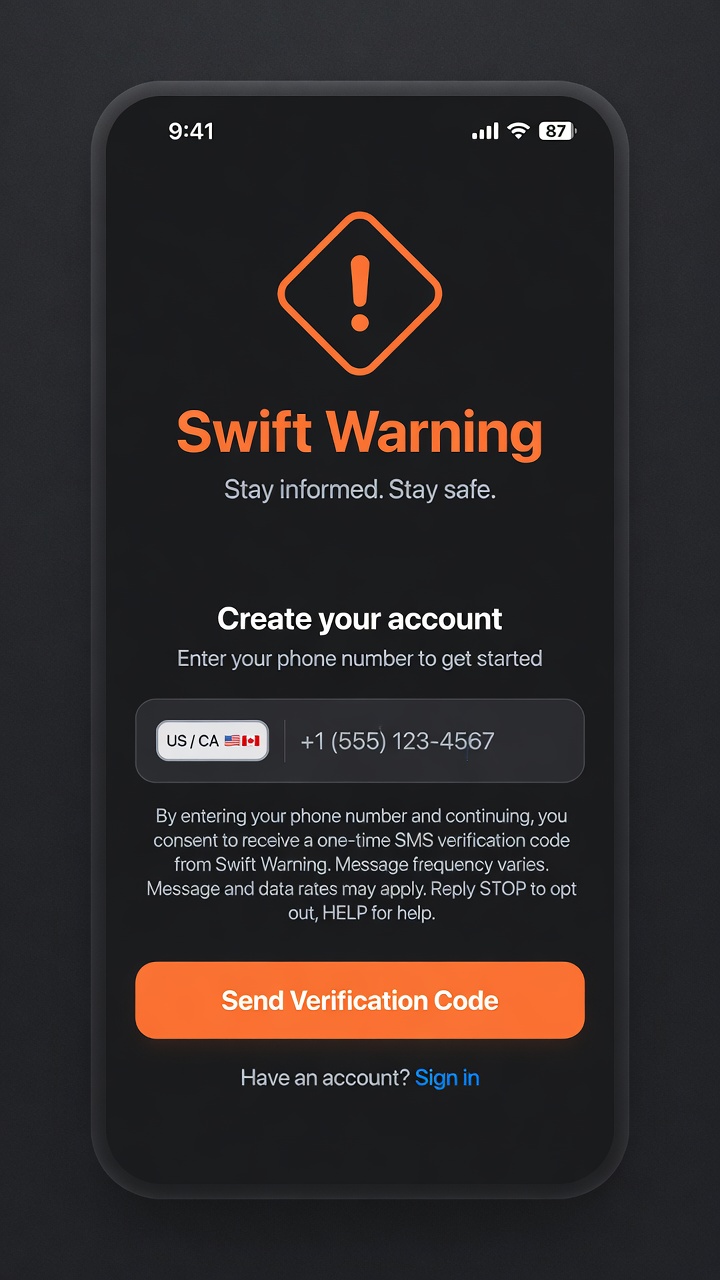
The hosted screenshot matches the Create Account screen. The Sign In screen uses the same consent copy above the Sign In button.
Message frequency varies. A typical user receives one code per sign-in or registration attempt. Codes expire in five minutes, and resend is limited to once every five minutes. Message and data rates may apply.
Sample messages:
Opt-out reply: Swift Warning: You are opted out and will receive no further SMS messages. Reply START to opt back in.
Help reply: Swift Warning help: Support is available in the Swift Warning app. Reply STOP to opt out.
Optional safety or marketing messages are not part of this program and require a separate choice.
Call to Action
Consent is collected only in the Swift Warning iOS or Android app. There is no public website signup form.
Install or open the Swift Warning app and choose Sign In or Create Account.
Type your own US or Canadian mobile number. Swift Warning does not use purchased, rented, or third-party phone lists.
The exact consent sentence appears directly above the Sign In or Send Verification Code button.
Tapping Sign In or Send Verification Code is the consent action. Swift Warning then sends one one-time login or registration code for that request.
Related legal pages
The privacy policy states that mobile numbers are not shared with third parties. Message frequency varies. Message and data rates may apply.